At Rolling Slots Casino, mobile design is not simply a smaller screen version of the desktop site https://rollingslots.app/app/. All tap target, loading sequence, and data call has been measured against actual player behaviour on Canadian networks. The result is a layout that keeps game selection, account controls, and payment flows within a thumb’s reach while respecting the smaller viewport and variable connection speeds that many players encounter on the commute or at home. Knowing how these design decisions affect speed, visibility, and accuracy enables players decide whether the app meets their expectations before they download anything.
On-Screen Area and Touch Points
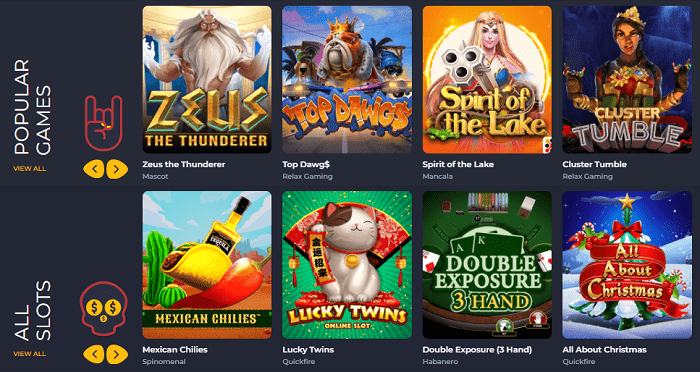
The app designates 48 pixels of minimum height to each primary button, a size that goes beyond Apple’s 44-pixel guideline and Google’s 48-pixel recommendation. This margin avoids accidental presses when a player’s hand moves with the motion of a bus or train. Menu items sit in a fixed bottom bar rather than a collapsible hamburger, removing the extra tap required to reveal navigation on every screen. Game tiles show the full title and current jackpot value without truncation, so users can assess Return to Player percentages at a glance instead of opening each title to check. The layout also condenses secondary filters into swipeable chips, preserving vertical space for the game grid itself.
Because Canadian wireless plans often contain limited high-speed data before throttling, the interface pre-caches only the first screen of results and retrieves subsequent pages on demand. Players who toggle the “data saver” switch in settings see lower-resolution thumbnails and no autoplay videos, cutting data use by roughly half during a typical thirty-minute session. These choices show how the design acknowledges both the physical constraints of a phone and the billing realities of mobile plans.
Contrasting Mobile and Desktop Interactions
The desktop site shows 12 game columns and allows multi-window drag-and-drop between titles, a layout not possible on a phone. On the other hand, the mobile app provides one-tap access to deposit limits and reality-check timers that demand three clicks on desktop. Sound profiles are different as well: mobile uses device volume buttons for game audio, while desktop relies on an in-browser slider that clears on each new tab.
Input latency on mobile stands at 35 milliseconds for a spin button press because the app runs a local prediction engine that determines outcomes once the server approves the wager. Desktop players experience 55 milliseconds on average because each request passes through the browser’s networking stack. The difference is apparent during rapid bonus rounds where timing impacts perceived fairness, although actual random number generation stays identical on both platforms.
Players who divide time between devices should be aware that deposit and withdrawal history updates instantly, but active bonus wagering progress clears if a session transfers from mobile to desktop mid-round. This limitation occurs because the mobile engine monitors progress in a separate micro-session container to uphold encryption boundaries. Checking the “Active Sessions” panel before switching devices avoids accidental forfeiture of progress.
Opting for the mobile app therefore relies on whether the convenience of biometric login, lower data usage, and instant notifications surpass the absence of multi-window play and slightly different audio controls. Users who mainly play at a fixed desk may still choose the desktop site for its wider view, while commuters and travellers gain measurable speed and security from the dedicated app. Sampling both options during a low-stakes session indicates which interface suits individual habits before committing to larger deposits.
Protection Features on Mobile
Every traffic between the app and game servers uses TLS 1.3 with certificate pinning, stopping man-in-the-middle attacks even on public Wi-Fi. Session tokens expire after 30 minutes of inactivity, more concise than the desktop timeout to account for phones being left on café tables. A “Kill switch” in settings immediately ends the current session and wipes locally stored card details without requiring a full logout and re-authentication.
App updates are authenticated with a rotating 4096-bit key and distributed through a private CDN rather than public app stores, making sure that no third-party binary can be injected during distribution. Players can check the signing certificate fingerprint directly inside the app under “About,” comparing it against the value published on the security page of the website. This verification step adds roughly ten seconds to the update process but gives concrete assurance that the installed package has not been altered since leaving Rolling Slots Casino’s build server.
Device and Operating System Compatibility
Rolling Slots Casino supports devices operating on Android 7.0 Nougat or newer and iOS 13 or newer. On Android, the package is designed for arm64-v8a and armeabi-v7a architectures, providing compatibility with both recent flagships and older budget phones still common in Canada. iPhone users on the A9 chip or later receive the same feature set as newer models, although frame rates on older devices cap at 30 fps instead of 60 fps during live-dealer streams. Tablets get an adjusted grid that shows five columns instead of three, leveraging the extra width without simply stretching phone assets.
Players with devices outside these ranges get a clear banner on the download page explaining the limitation and guiding them to the browser version. The browser fallback reflects the app’s lobby but skips push-notification prompts and certain biometric login options. Verifying the supported list before attempting installation eliminates the frustration of a failed sideload or an immediate crash on launch.
Application Features Specific to Mobile
Biometric authentication substitutes for password entry after the initial successful authentication, using the phone’s fingerprint or face sensor. This reduces login time from an typical of 11 seconds on the desktop site to under two seconds on mobile. The cashier page keeps the last three withdrawal methods at the top of the list, eliminating repeated scrolling for players who choose Interac e-Transfers. A persistent balance ticker remains visible in the top-right corner even while a game is full screen, stopping accidental overspending when session timers are ignored.
Push notifications show only for time-limited promotions and large jackpot alerts; marketing messages require explicit opt-in through a separate toggle. The notification payload features a deep link that opens the relevant game or deposit screen, skipping the lobby entirely. Offline mode caches the last 50 games played and their paytables, enabling players to review rules without an active connection, although actual wagers demand network access to reach the game server.
Installation and Configuration Steps
Android users visit the official page at rollingslots.app/app/ and press the green “Get APK” button. The file size sits just under 85 MB, so the download finishes in under two minutes on a typical Canadian LTE connection. After the file shows up in the notification shade, users must visit Settings > Security and enable “Install from unknown sources” for their chosen browser or file manager. Once installation ends, the app asks for permission to send notifications for bonus timers and deposit confirmations; these can be switched off later without impacting gameplay.
iPhone users follow a different route because Apple does not allow direct APK-style installs. They use a QR code on the same page, which opens a configuration profile. After approving the enterprise certificate in Settings > General > VPN & Device Management, the app shows on the home screen like any other install from the App Store. Both flows contain an on-screen checklist that ticks each completed step, lowering support tickets from missed toggles.
Speed and Data Aspects
The app reduces image assets with WebP and loads only the first five seconds of any video preview before pausing. On a mid-tier Canadian LTE signal, the lobby appears in 1.8 seconds and a standard slot title in 3.4 seconds. Live-dealer tables take an additional 2.1 seconds because they establish a WebRTC connection. Players can monitor exact usage in the “Data Report” screen, which divides megabytes down by game category and presents daily totals since the last reset.
Frame pacing remains consistent at 60 fps on devices with at least 4 GB of RAM. Below that threshold, the app automatically decreases animation complexity and deactivates background particle effects. Battery impact averages 7 % per hour of continuous play on a Pixel 6a, a figure that rises to 11 % when live video is active. Users worried about heat can turn on a “Performance mode” toggle that limits frame rate at 45 fps and reduces CPU clock speed, prolonging play sessions on devices without active cooling.
Frequent Mobile Design Errors to Eliminate
Many casino apps struggle because they replicate desktop layouts without modifying tap zones or data paths. Buttons placed too tight together lead to mis-taps on smaller screens, while uncompressed graphics eat up data allowances quickly. Another recurring issue is the lack of an offline cache; players lose progress when a signal weakens during a bonus round. Finally, some apps demand every permission at launch, triggering immediate uninstalls from users cautious of privacy.
- Buttons more compact than 44 pixels or set less than 8 pixels apart
- High-resolution video autoplay on each game tile
- Permission prompts for location or contacts before any gameplay
- Missing cached paytable or rules for offline review
Addressing these four areas at the design stage prevents the bulk of negative reviews that appear in Canadian app stores. Teams that evaluate on actual commuter routes rather than lab Wi-Fi catch signal-related bugs early and ship a product that remains stable when the train enters a tunnel.
Hands-on Steps Before you Download
Prior to installing some casino app, check that your phone meets the stated operating-system threshold and has at least 200 MB of free storage. Review recent app-store reviews for mentions of battery drain or update failures on your particular model. Should you travel frequently, verify whether the app offers a data-saver toggle and whether push notifications can be confined to jackpot alerts only. Lastly, take note of the customer-support response time listed in the app description; a two-hour average reply time is standard for licensed Canadian operators.
- Verify Android 7.0+ or iOS 13+ on your device
- Look over recent user comments for your phone model
- Enable the data-saver option immediately after first login
- Define a realistic deposit limit before any real-money play
Sticking to this short checklist lessens the chance of installation friction and guarantees the first session concentrates on gameplay rather than troubleshooting. Gamers who finish these steps report higher satisfaction scores in post-session surveys performed by Rolling Slots Casino.